Transfer Account Information
For Current Support Employees
or Current Substitutes
Applying for INSTRUCTIONAL
POSITIONS:
Support employees
or substitutes who wish to apply for
Instructional
Positions
(Support or substitute to Instructional)
must
create a New BEACON Account
and provide all supporting
documents necessary to complete
your
instructional application
package before you can apply for
instructional positions.
If you already have a transfer
account, you will not be able to
create a new account. You
may either allow your transfer
account to expire normally after
90 days and then create a new
account or you may contact Human
Resources to delete your current
Support account.
Transfer Account Information
For Current Employees:
Current employees must create a
transfer application in BEACON
to be eligible to apply for advertised positions.
Transfer accounts must be
recreated and/or extended
for a second period of
90 days only. You will receive email
notifications.
No additional documentation such
as resumes, references, or any
other documents will be
required for these accounts.
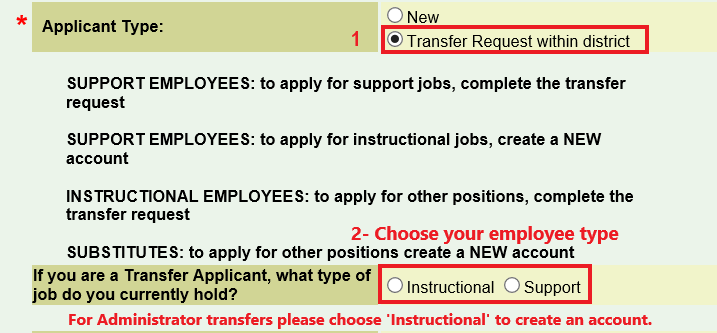
To create a transfer
account, you must select
'Transfer Request within
district', then either
Instructional or Support as
shown below:
Transfer Account Information
for Short-Term Teachers
or temporary Instructional
Assistants:
You will be able to create and
maintain a Transfer Account (if
you do not already have one) for
6 months after your separation
date.
No additional documentation such
as resumes, references, or any
other documents will be
required for these accounts.
After the 6 month period
expires, if you
have not been re-employed, you
will be required to create a new
Beacon Account.
Transfer Account Step 1 - Create
and submit your transfer account
Transfer Account Step 2 - Look
for and apply for positions
through your transfer account
To begin your BEACON
Transfer Account, click
here:
BEACON TRANSFER ACCOUNT
